Variants that don't break
Sizes in one cell or across columns become proper variants, each with its own price, SKU and stock.
CSV, Excel or PDF, exactly as your supplier sent it. Csvio fixes the columns, prices and variants, and you approve every product before it goes live.
Free plan No credit card Nothing goes live until you confirm
“2–3 hrs for 500 products, and variants always breaking somehow.” A dropshipper on r/dropshipping, describing a Shopify import by hand
So you rename columns, split sizes by hand, strip the “$” from every price, and the import still fails on row 312.
| The same file | By hand, with Shopify's template | With csvio |
|---|---|---|
| Your file's own column names | Rename every one to match the template | Matched for you |
S/M/L/XL in one cell | Split into separate rows yourself | Becomes variants automatically |
Prices like $24.00 USD | Clean them first | Cleaned on the way in |
| Next file in the same layout | Same work again | Layout remembered |
Comparing apps? Read csvio vs Matrixify.
No template, no renaming.
Anything it couldn’t fix is listed for you.
Straight into your store.
Same supplier next week? Csvio remembers their layout, so it’s upload and import.
Real screens from csvio inside Shopify admin.
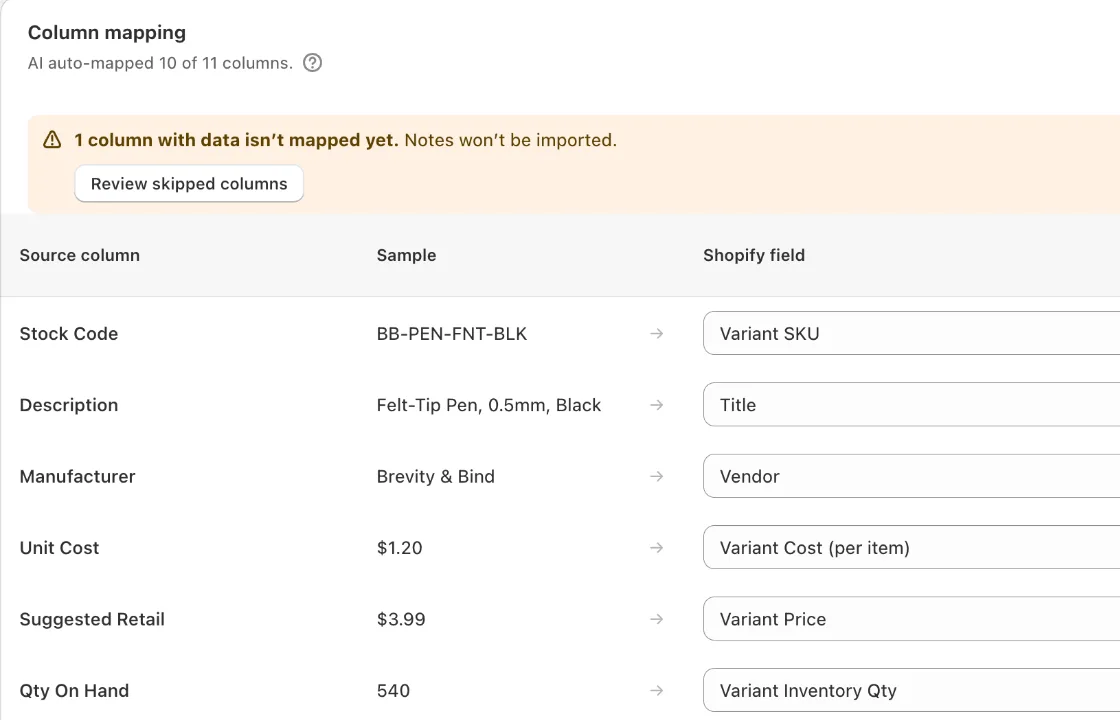
“Unit Cost” becomes cost, “Suggested Retail” becomes price. The one column it skipped is named, and you can change any match.
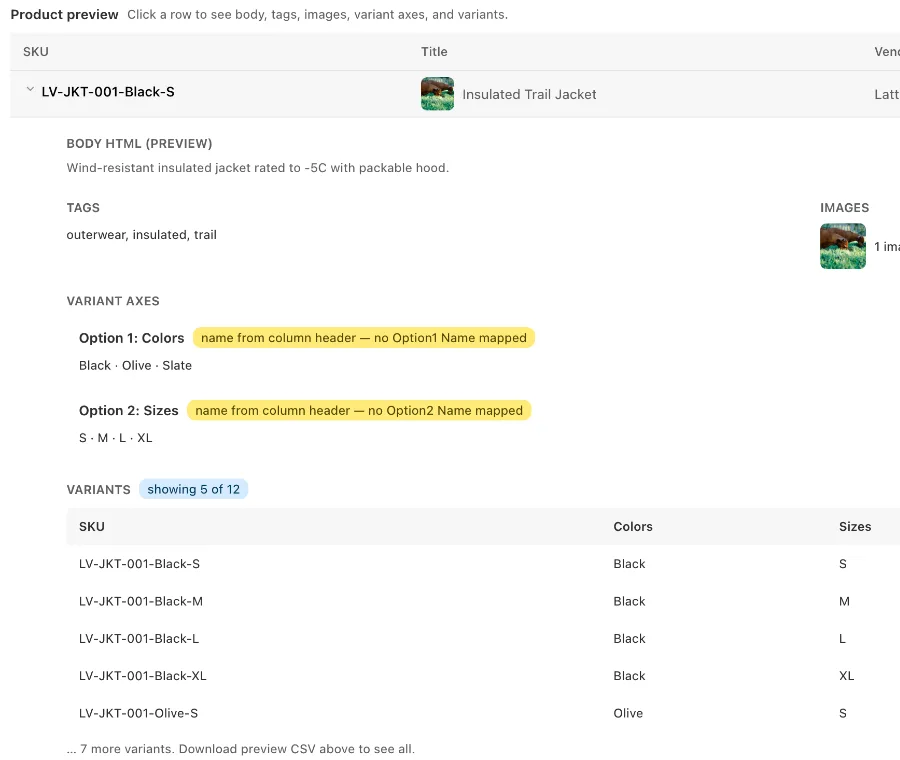
Colours and sizes from single cells, checked product by product before anything is created.
The parts of a supplier file that break Shopify's importer are the parts csvio handles.
Sizes in one cell or across columns become proper variants, each with its own price, SKU and stock.
Csvio works out what each column means. You can change any match.
Currency signs, units and country names are fixed on the way in. Anything it can't read is left blank and listed for you.
Cleaned
“6,90 EUR”For stores that restock from the same suppliers every week or month.
Upload the new list. See what was added, changed or removed, and tick what to apply.
New · will be created
Changed · will be updated
Gone from the file · archived, can be undone
1 unchanged product is left as it is. Nothing reaches Shopify until you apply.
Csvio fetches the file from a link or FTP server on your schedule, then emails you a summary.
Email after each run, and right away if a run fails.
On the Pro and Scale plans. Compare plans
Billed through Shopify. Cancel anytime. Or pay only for what you import.
Try it on a real file
$0
Install freeBring catalogues in, in bulk
$19/mo
Choose StarterKeep them in sync on their own
$39/mo
Choose ProBig catalogues, lots of suppliers
$79/mo
Choose Scale2¢ for each product an import creates or a bulk edit changes, billed by Shopify at the end of each 30 days. Up to 5,000 products per import, bulk edit and bulk delete included (deleting is free). No PDF catalogs, resync or schedules. Once a month passes $19, Starter costs less, and the app tells you.
More in the Help Center.
No. Upload it as it came. Csvio reads the file's own column names and matches them to Shopify. You can change any match before importing.
CSV (.csv) and Excel (.xlsx) on every plan, and PDF catalogs on every plan except Pay as you go. Save an old .xls file as .xlsx first. PDFs work when the products are laid out in a table. The Free plan includes one PDF a month.
Not when you create products. Csvio skips any product your store already has and tells you which ones. Changing existing products is a separate choice, Bulk edit, and you see every change before it runs.
There's no undo button, so csvio shows you every product before anything is created, and nothing goes live until you confirm. If something isn't right afterwards, fix the file and use Bulk edit, or remove the products with Bulk delete on a paid plan.
They're skipped, not the whole file. The results screen lists each one with the reason, and you can retry just those rows once they're fixed.
If your file has image web links, csvio uses them. If you have the image files instead, upload them (a .zip of the folder works) and csvio matches them to your products by file name.
Through your Shopify bill, monthly. The Free plan needs no card. You can change plan or cancel anytime from the app.